Go back

Create your own design for your A6 NFC display

Would you like a Google review display customised to match your brand? Creating your own design gives your display a professional, recognisable look, whether it’s placed on a counter, table or reception desk. In this article, we’ll explain how to create your design and what to keep in mind when submitting your artwork.

Download the Adobe design templates

We’ve prepared a ZIP file containing useful templates for:

  • Adobe InDesign (.indd)
  • Adobe Illustrator (.ai)
  • Adobe Photoshop (.psd)

Designing in Canva

Creating your design in Canva? That’s absolutely fine, as long as your file is set up correctly for printing.

Always use the correct dimensions

Create a new design with dimensions of 100 x 150 mm.

Add 3 mm bleed

For a professional print finish, bleed is essential. This prevents unwanted white edges after trimming. Make sure backgrounds, colours and images extend beyond the edges of your design.

In Canva, enable this by going to: File > Settings > Show print bleed

Design tip: Keep important elements away from the edges
Avoid placing text, logos and QR codes too close to the edges. Leave enough space to ensure nothing important is cut off during trimming.

Important
Files that are not supplied correctly may require additional adjustments or cause delays in production.

Downloading your file correctly

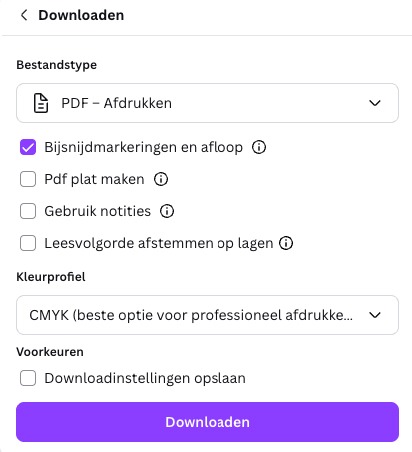
  1. Click File in the top-left menu
  2. Click Download
  3. Select PDF Print as the file type
  4. Make sure Crop marks and bleed is ticked
  5. Click Download
pdf exporteren Canva

Important things to keep in mind

QR code placement

You can use our templates to indicate where you’d like the QR code to appear. You don’t need to add the QR code yourself. Simply show us where you’d like it placed and how large it should be. We’ll add the QR code for you.

Tip: The larger the QR code, the easier it is to scan.

NFC chip

The display also features NFC technology. This means customers can either scan the QR code or simply tap their phone against the display to open your review page. You don’t need to worry about the technical aspects of the NFC chip when creating your design, as we’ll integrate it discreetly into the material.

Tip: Add an NFC icon to your design (for example, next to the text or QR code). This makes it immediately clear to customers that they can also tap their phone to leave a review.

Multiple locations?

Do you have multiple locations and want a unique review link for each one, while keeping the same design across all your displays? No problem!

Simply provide one design file that can be used for all locations. We’ll make sure each display has its own unique QR code linked to the correct location.

To ensure everything is set up correctly, please include an Excel file containing the following information:

Location name Review link (URL)
Wizard Card Utrecht https://g.page/r/voorbeeldlink1
Wizard Card Amsterdam https://g.page/r/voorbeeldlink2

Not sure if you have the correct link? Watch our video to find your unique review link.

How to submit your design

Is your design ready? You can send it to us using one of the following methods:

📧 By email

Send your file to info@wizardcard.nl and include your order number. This helps us quickly match your design to the correct order.

📎 File too large?

No problem. Use WeTransfer.com to securely share your design with us. Send the download link to info@wizardcard.nl and remember to include your order number in the message.

Frequently asked questions

Ja, dat kan. Maak een document aan van 100 x 150 mm en

Yes, absolutely. Create a design measuring 100 x 150 mm and add 3 mm bleed on all sides.

Export your design as a high-quality PDF Print file, with crop marks and bleed enabled. If you use Canva Pro, you can also select CMYK colours, although this isn’t required. We’ll always check your file before sending it to print.

Yes, you can, but it’s not required. Once we’ve received your design and the link, we’ll add the correct QR code for you. This ensures everything works properly and that the NFC chip directs customers to the same link.

Once we’ve received your file, we’ll check the dimensions, margins and technical specifications. If anything needs adjusting, we’ll get in touch with you to discuss the necessary changes.

Yes, absolutely! Simply get in touch with us. We’ll create a professional design for you, which you can review and approve before printing.

Your own digital
visitekaartje

  • Delivered within 2 days
  • Your own design
  • Excellently rated